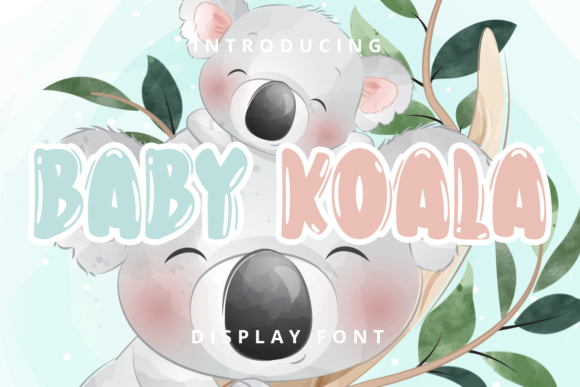
Baby Koala: A Playful Display Font for Modern Web Design
Choosing the Right Typeface for a Creative Portfolio Site
I was in the middle of designing a portfolio homepage for a client in the children’s illustration space. The goal was to create a warm, inviting digital space that felt both professional and fun. Typography was going to play a huge role in setting that tone. I started testing a few display fonts for the hero section, and that’s when I came across Baby Koala. Right away, it caught my eye with its soft curves and cheerful character spacing.
Baby Koala is a display font, which means it’s not meant for long blocks of text. Instead, it shines in headlines, call-to-action buttons, and short branding statements. What stood out to me was how its bubbly personality balanced well with the more structured layout I was building. It felt natural, not forced—like a friendly voice speaking to the user before they even read the content.
Testing Baby Koala Across Web Layouts
I first dropped Baby Koala into the hero banner. The headline read “Welcome to a World of Whimsy,” overlaid on a pastel background. Even in that early stage, the font’s rounded edges and open spacing made the text feel light and readable. It didn’t compete with the background image, which was important for maintaining visual hierarchy.
Next, I tried it in the section headers. I used a slightly smaller size and paired it with a clean sans serif for the body text. This helped create a clear contrast between headings and supporting content. It worked well in both desktop and mobile views, though I did tweak the letter spacing on smaller screens to keep the characters from feeling cramped.
Where Baby Koala Works Best
This font feels most at home in digital spaces that want to communicate creativity, warmth, and approachability. I’ve used it in:
- Hero sections for boutique online stores
- Course sales pages targeting younger audiences
- Blog headers for lifestyle and parenting blogs
- Call-to-action buttons on campaign landing pages
- Logo text for brands with a playful identity
It’s especially effective when used sparingly. Too much of Baby Koala can dilute its charm and make a layout feel less polished. I found it works best as a highlight font—used for titles, short phrases, or decorative accents—not for long paragraphs or navigation menus.
Readability and Responsive Design
One of the first things I check when testing a new font is how it behaves on mobile. Baby Koala held up well, but I did make a few adjustments. On smaller screens, I increased the font size slightly and added a touch more line spacing to avoid visual clutter. For buttons, I made sure the text had enough contrast against the background color, especially when using it on dark themes.
It also performed well over image overlays. Since the font has a natural openness, it didn’t get lost against soft backgrounds like watercolor textures or pastel gradients. That made it a great fit for promotional banners and hero images where text needs to pop without being overly bold.
Font Pairing for Web Design
Because Baby Koala is a display font, I always pair it with something more neutral for body text. My go-to was a clean sans serif like Open Sans or Lato. This helped maintain readability while letting Baby Koala do the heavy lifting in branding areas.
For more editorial-style layouts, I experimented with pairing it with a serif font like Merriweather for subheadings. That gave the design a layered, magazine-like feel without sacrificing usability. The contrast between the bubbly headline and the classic serif created a nice rhythm that guided the eye through the page.
What to Check Before Using Baby Koala
Before finalizing the font for the live site, I made sure to check a few technical details:
- Webfont availability: I confirmed that Baby Koala was available on a web font service like Google Fonts or Adobe Fonts, or that I could self-host it if needed.
- File formats: I downloaded the font in WOFF and WOFF2 formats for optimal browser support and performance.
- Alternates and weights: I checked if the font included alternate characters or stylistic sets that could be used for special design moments.
- Multilingual support: Since the client wanted to expand into other markets later, I made sure Baby Koala supported the necessary language sets.
- Licensing: I reviewed the font’s commercial license to ensure it could be used across web platforms, client projects, and branded assets without legal issues.
Final Thoughts: A Font That Adds Personality Without Sacrificing Usability
Baby Koala is the kind of font that brings a smile to your face while still holding up in a real-world web design project. It’s not just about looks—it’s about how it supports the brand voice, enhances readability, and integrates smoothly into a responsive layout.
If you’re working on a digital brand kit, a product landing page, or a creative portfolio site, Baby Koala might be the perfect touch to bring warmth and personality to your design. Just remember to use it intentionally, pair it wisely, and test it across devices to make sure it supports both aesthetics and usability.